


UNIMIG
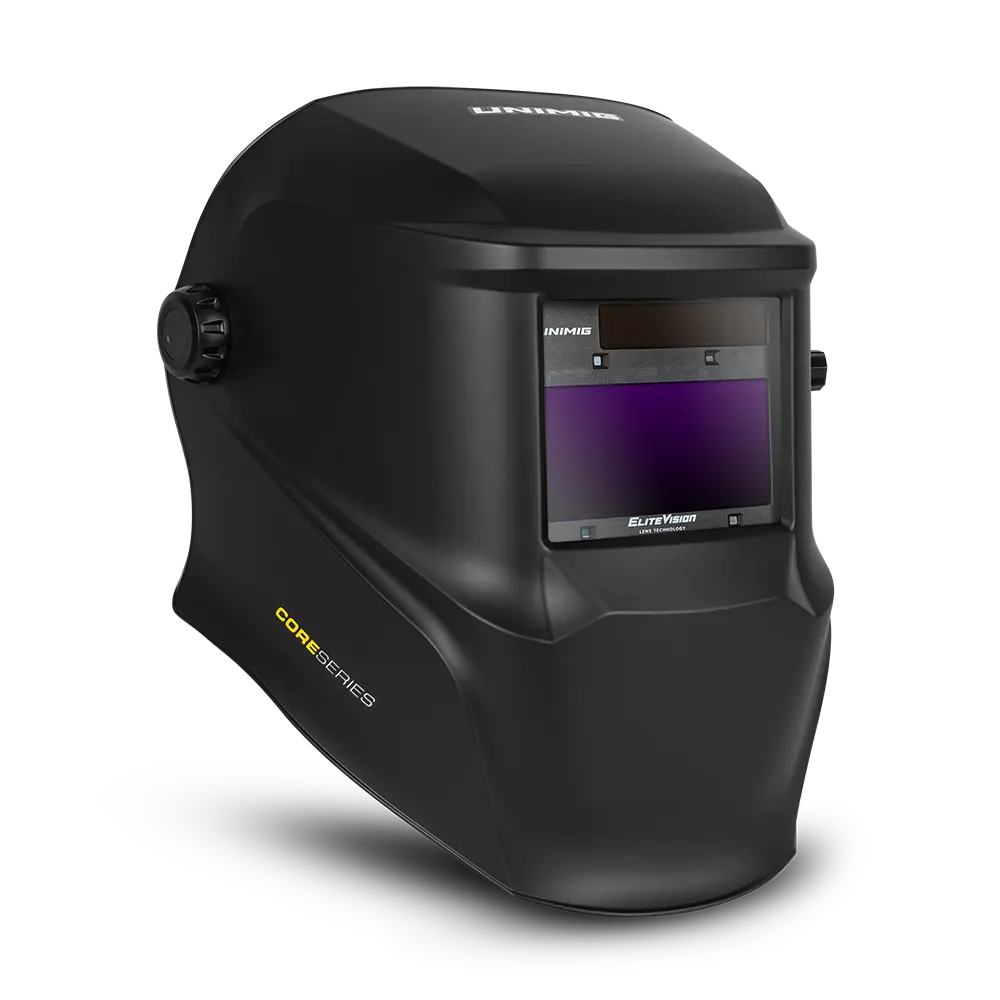
UNIMIG Core Series Welding Helmet - Black U21031
UNIMIG Core Series Welding Helmet - Black U21031
GST included. Shipping calculated at checkout.
SKU: U21031
Available to order
Delivery options
Select your suburb for a delivery estimate. Additional courier options are available at checkout.
Estimates are for this item and quantity only, in AUD excluding GST. Final availability, shipping and GST are confirmed at checkout.
Buy with confidence
Delivery & pickupAvailable to order · Lead time varies
Ordered from our supplier. This item is not currently stocked at our store. Contact us to check the expected lead time before ordering. Dispatch depends on supplier availability.
Australia-wide delivery. Available shipping options and costs are shown at checkout.
Free Smithfield pickup. Wait for your Ready for Pickup notification before travelling to the store.
Returns & exchanges90 days for eligible unopened items
Change-of-mind returns are available within 90 days of receiving your order for eligible items. Items must be unused, unopened, complete, in original packaging and resellable condition, with proof of purchase.
You pay return shipping for change-of-mind returns. Original shipping is not refunded. Please request approval before sending an item back.
Exclusions include items marked Special Order, gases and cylinders, hazardous materials, chemicals, and custom or cut-to-length items. See the full policy for all exclusions.
Warranty & supportProduct-specific warranty & support
Manufacturer warranties apply where available. See this product’s specifications or contact our team to confirm the applicable warranty.
For a fault or incorrect item, contact our team with your order details and a description of the issue.
Need help choosing?
Call our Smithfield team for product advice and compatibility checks.
Take a closer look
Product information
Description
UNIMIG Core Series Welding Helmet — Black U21031 combines an auto-darkening filter with a 98 × 48 mm viewing area and 1/1/1/2 optical classification. Select the appropriate welding shade or grinding mode and adjust the harness to the user and task.
Key Features
- EliteVision true-colour lens: Allows a broader range of visible colours through the lens for a clearer, natural view of the work and weld pool, helping reduce eye fatigue.
- Viewing area: 98 × 48 mm view for weld positioning and observation.
- Optical quality: 1/1/1/2 classification covers distortion, light diffusion, shade consistency and viewing-angle consistency.
- Arc detection: 4 arc sensors detect the arc and activate the auto-darkening filter; keep every sensor’s view unobstructed.
- Manual shade selection: Set the required 9–13 shade using the shade selector knob.
- Grinding control: Switch to grind mode using the exterior control without removing the helmet. The mode indicator signals when grinding is selected; return to welding mode before welding.
- Sensitivity and delay: Adjustable sensitivity suits different light/arc conditions. A shorter light-return delay suits tack/short welds; a longer delay allows for residual glow after higher-current welding.
- Adjustable four-point harness: Adjust the contact points to hold the helmet securely and distribute weight more evenly. Neck-band, head-strap, distance and angle adjustments help set the fit.
- Replaceable backup-battery power: Solar cells work with a CR2450 battery. A low-battery indication signals when replacement is required.
Before You Buy
- Choose the correct shade for the process and current using the full manufacturer shade guide; the listed minimum TIG current is 10 A. The guide also includes shade 14/15 applications outside this helmet’s maximum shade 13, so the broad MIG/TIG/STICK process names are not approval for every current or task.
- Do not weld in grind mode: the filter will not darken. Check operation, clean covers and unobstructed sensors before every use. Stop welding immediately if darkening fails; check mode, sensitivity, battery condition and seek UNIMIG service if the fault persists.
- The manual excludes overhead welding, laser welding and laser cutting. This helmet does not protect against explosive devices or corrosive liquids. Use suitable primary impact eye protection and all other task-specific protective equipment.
- Replace scratched, cracked, pitted or spatter-obscured covers and damaged shell/components. Fit only approved matching parts. Do not immerse the filter, use solvents or disassemble the auto-darkening filter.
- The manufacturer describes room for the compatible Elipse half-mask respirator. A respirator is separate: choose and fit its approved filters for the actual hazard; helmet compatibility alone does not give respiratory protection.
- Keep new and used button batteries away from children. Suspected swallowing or insertion requires immediate medical attention; follow the full battery safety instructions.
- Adjust both sides of the harness equally for proper vision and secure the distance/angle locks before use. Follow the model-specific replacement and harness procedures in the manual.
In the Box
- 1 × UNIMIG Core Series welding helmet — Black
- Operating manual
- Carry bag
- Spare inner and outer protective lens covers
Helmet Specifications
| Parameter | Value |
|---|---|
| Manufacturer part number | U21031 |
| Weld shade selector | External numbered dial, DIN 9–13 |
| Sensitivity and delay controls | Separate sensitivity and delay dials |
| View area | 98 × 48 mm |
| Arc sensors | 4 arc sensors |
| Optical classification | 1/1/1/2 |
| Light state | DIN 4 |
| Dark shade range | DIN 9–13 |
| UV/IR protection | DIN 15 |
| Light-to-dark switching | 0.1 ms |
| Sensitivity | Adjustable |
| Shade control | Manual |
| Grinding control | External control |
| Minimum listed TIG current | 10 A |
| Manufacturer-listed standards | AS/NZS 1337.1 B (high impact); AS/NZS 1338.1 (auto-darkening) |
| Filter dimensions | 110 × 90 × 10 mm |
| Dark-to-light delay | 0.1–0.8 seconds |
| Power supply | Solar cells and a CR2450 replaceable battery |
| Operating temperature | −5 °C to 55 °C |
| Storage temperature | −20 °C to 55 °C |
| Harness angle positions | 3 |
Optical Classification
| Quality dimension | Manufacturer-described meaning |
|---|---|
| Optical clarity | Image distortion through the lens. |
| Diffusion of light | Lens uniformity without impurities obscuring the view. |
| Shade consistency | Uniform selected shade across the viewing area. |
| Angle consistency | Consistency of shade and view when looking through the lens at an angle. |
| This model’s four-part classification | 1/1/1/2 |
Matching Replacement Parts and Accessories
| Component | Manufacturer part number |
|---|---|
| Inner/outer cover-lens kit | U21039 — separately sold replacement kit with 5 outer and 2 inner covers |
| Four-point harness | U21035 — Core/Impact replacement harness |
| Harness sweatband and back-pad set | U21036 — fits the U21035 harness |
| 1.5× magnification lens | U21010 — separately sold |
| 2.0× magnification lens | U21011 — separately sold |
| 2.5× magnification lens | U21012 — separately sold |
Product Documents
- UNIMIG Core Series Helmet Operating Manual
- UNIMIG Core Series lens cover kit U21039 — replacement reference
- UNIMIG Welding Helmets — Range and Replacement Parts Brochure
Warranty
UNIMIG’s current exact product support lists a 3-year manufacturer warranty, from purchase through an authorised dealer and subject to the applicable manufacturer terms. Service life depends on use, cleaning, storage and maintenance; inspect the helmet regularly. Keep proof of purchase and use only approved parts/modifications. Normal wear, consumables, misuse and unauthorised repairs are subject to the applicable exclusions. Contact the retailer or UNIMIG for claim assessment. This additional warranty does not exclude rights under the Australian Consumer Law.
Specifications
The technical details, grouped for easy checking.
No matching specifications. Try another term or clear your search.
Documents & manuals
Keep the setup and technical information close at hand.
Warranty


Request Pricing or a Quote
Choose the request that suits you and we’ll review the details with this product.